

Troubleshooting Intimate Wellness Device Issues
Table of Contents
- Why Your Intimate Wellness Device Isn't Cooperating
- Intimate Wellness Device Not Charging: Diagnosis and Fixes
- Intimate Wellness Device Won't Turn On: Quick Fixes
- Weak Sensations or Device Shutting Off Mid-Session
- Discomfort, Heat, and Fit Problems
- Intimate Wellness Device Cleaning and Care
- Intimate Wellness Device Warranty and Support
- Frequently Asked Questions
Last Updated: October 13, 2026
Why Your Intimate Wellness Device Isn't Cooperating
Nothing kills the mood like your favorite toy deciding it's done for the day.

At The Flirty Femme, we've helped countless people master troubleshooting intimate wellness device issues and get back to business.
This guide walks you through troubleshooting intimate wellness device problems and how to fix them, from charging gremlins to positioning puzzles.
Intimate Wellness Device Not Charging: Diagnosis and Fixes
A device that won't charge is basically a paperweight. Let's fix that.
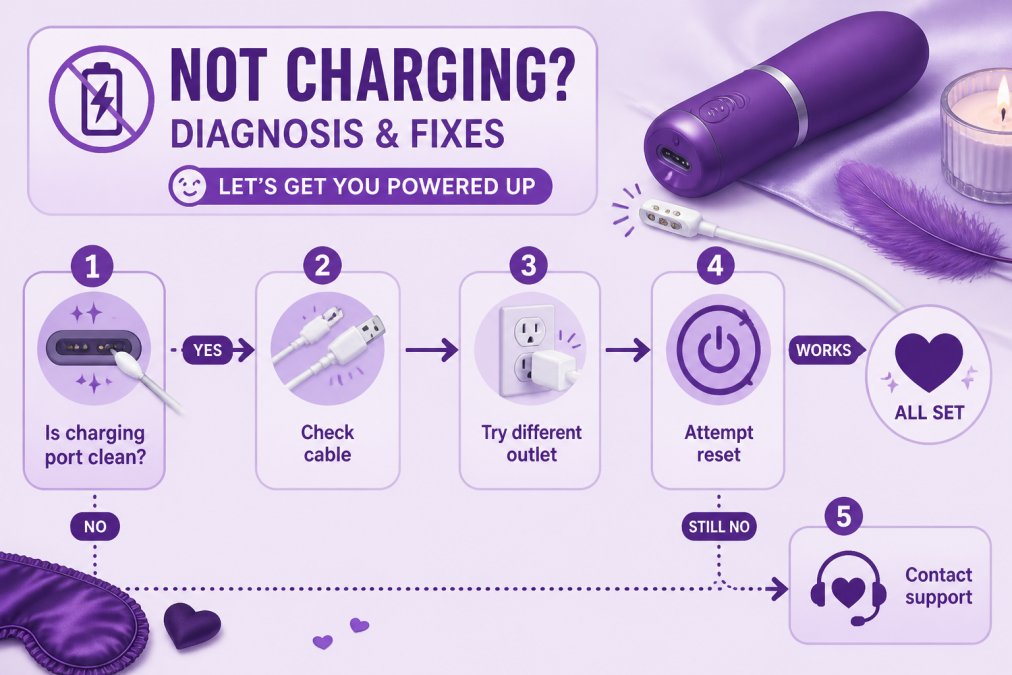
Check the Charging Port First
The most common culprit? Debris in the charging port. Lint, dust, or cleaning residue can block the connection completely.
Here's what to do:
- Use a dry cotton swab to gently clean the port
- Check the charging cable connector for damage or corrosion
- Make sure both the port and cable are completely dry before attempting to charge
White or green buildup inside the port is oxidation. Gently rub it with a slightly damp cotton swab, then let everything dry for at least 30 minutes before trying again.
Try a Different Power Source
Sometimes the problem isn't your device, it's what you're plugging it into.
Test these:
- Try a different outlet
- Use a different USB cable
- Plug into a computer USB port instead of a wall adapter
Wall adapters can fail silently. A spare phone charger is a quick way to rule out adapter problems.
Battery Reset: The Nuclear Option
When nothing else works, a full battery reset sometimes does the trick. It clears software glitches that might be preventing charging.
The process varies by device, but here's the general approach:
- Leave the device completely unplugged for 24 hours
- Plug it in and let it charge for a full 4 hours without interruption
- If your device has a button combination for reset, check your manual (usually holding multiple buttons for 10-15 seconds)
Think of it like turning your device off and on again, but for the battery itself.
Intimate Wellness Device Won't Turn On: Quick Fixes
A device that won't power up needs a quick diagnostic. Usually it's one of three things.
Is Travel Lock Engaged?
Travel lock exists so your device doesn't accidentally activate in your suitcase or nightstand. But it's easy to forget you turned it on.
Check your manual for how to unlock it. Common methods:
- Holding down two buttons simultaneously for 5+ seconds
- A specific button sequence (often top two buttons)
- Holding the power button longer than usual
If your device shipped with travel lock engaged, you'll need to unlock it before it responds to anything. Sneaky little feature.
Check Your Battery Level
This one seems obvious, but a completely drained battery won't even show signs of life.
What to do:
- Plug in and let it charge for at least 30 minutes
- Some devices need 15-20 minutes before they'll power on at all
- Look for LED indicators that show charging status
Different blinking patterns usually mean different things, check your manual for what yours indicates.
Button Sensitivity and Stuck Controls
Buttons can get stuck or less responsive over time, especially if moisture or debris got inside.
Try these fixes:
- Press the power button firmly several times
- Hold it down longer than usual (5-10 seconds)
- Check that the button isn't physically stuck or stiff
If the button feels mushy or stuck, moisture likely got inside. Stop using it and contact support before things get worse.
Weak Sensations or Device Shutting Off Mid-Session
Two complaints land in our inbox more than any other: "it keeps dying on me" and "it doesn't feel like it used to." They sound the same. They are not. One is a power issue, one is a sensation issue, and treating them the same is how you end up buying a replacement you didn't need.
First: Which Symptom Do You Actually Have?
Run your problem through this before you touch a charger:
- Device powers off mid-session, no warning → power/battery path (below)
- Device stays on but vibration feels weaker than before → motor or settings path
- Device works fine solo but feels weak during partnered use → positioning and fit path
That last one trips up more people than you'd think. A device that feels like a dud at one angle can feel like a completely different product at another. Your anatomy didn't change. Your aim did.
Power Path: Why It Keeps Shutting Off
If your device is cutting out, the battery is the prime suspect, but "the battery" covers four different failures:
1. High settings drain faster than you think. Max vibration draws the most current. A device rated for hours on low might deliver a fraction of that on top speed. If yours dies fast only on max, that's physics, not a defect.
2. Cold reduces output temporarily. Lithium batteries lose usable capacity in the cold.
3. Age-related capacity loss. Rechargeable batteries degrade with cycle count. A few-year-old device holding less charge is behaving normally.
4. A failing charging connection. If the device only dies when the cable is jostled, the port or cable is the problem, not the cell.
Quick fixes to try, in order:
- Charge fully, then time the device on its lowest setting. That's your real baseline.
- Repeat on the highest setting and compare.
- Short on low too? The battery is degraded. Short only on high? That's normal draw, not a fault.
Motor Path: When the Vibration Itself Feels Off
If your device powers on fine and holds a charge but the buzz feels thinner or flatter, you're looking at the motor side.
What actually causes this:
- Mechanical wear. Motors lose amplitude over years of use. Gradual and permanent.
- Internal debris. Residue that worked past a seal can dampen moving parts. Sometimes cleanable, sometimes not.
- Low charge. A partially drained battery always produces weaker vibration. Rule this out first.
The diagnostic that works: charge to full, then test on the lowest steady setting, then the highest.
The Sensation Path Nobody Talks About
Here's the part most guides skip: sometimes the device works perfectly and the sensation still isn't there. That's not a malfunction, that's fit, angle, and contact.
Things that flatten sensation even on a fully functional device:
- Not enough lubrication. Friction mutes vibration transfer. More lube, more sensation. The single most common fix.
- Angle. Small changes in insertion angle change which tissue the device contacts. Nothing at one angle can feel like everything at another.
- Depth. Deeper isn't better. The most responsive tissue isn't always the deepest.
When It's Actually a Warranty Issue
Stop troubleshooting and contact support if:
- Runtime is short even on the lowest setting after a full charge
- The motor is silent or intermittent on every setting
- The device shuts off within minutes of a complete charge
Those are hardware failures, not user errors. Bring your receipt. Bring your model number. You'll get further, faster.
Discomfort, Heat, and Fit Problems
Discomfort is your body's customer service line. It's not being dramatic, it's filing a ticket. The trick is knowing which ticket, because "this feels weird" and "this is wrong" are two very different messages.
The Discomfort Decision Tree
Start here before you change anything:
- Pressure or fullness, no sharp pain → normal adjustment. Slow down, add lube, try a different angle.
- Sharp, shooting, or stabbing pain → stop. This is not a fit issue.
- Burning that doesn't improve with more lubrication → stop. Could be irritation, allergy, or infection.
Pain is information. Ignoring it doesn't make you tough. It makes you sore.
Fit, Angle, and Insertion, The Real Mechanics
Most discomfort complaints trace back to one of four things:
Lubrication. Water-based lube is the default: compatible with silicone devices and condoms, easy to clean. Silicone-based lasts longer but degrades silicone toys, never pair the two. Oil-based is a no-go with latex condoms and harder to clean off devices.
Angle. The vaginal canal angles toward the lower back, not straight up.
Relaxation. A tense pelvic floor resists insertion. Breathe, exhale slowly, let the muscles soften before you push anything anywhere.
Size and shape. A device too large for your body isn't a personal failing. It's a sizing mismatch.
Heat: How Warm Is Too Warm?
Heating features are one of the fastest-growing categories in intimate wellness devices, and one of the most misunderstood.

What you should know:
- Most heating devices top out around body temperature or slightly above. A common upper range sits near 104°F.
- Heat should feel like warmth, not a hot pack. If it feels hot, turn it off.
- Start with heat off, then add it once you're comfortable with the device's fit and settings.
If heat consistently feels uncomfortable, skip it. The feature is optional. Your comfort is not.
Body-Specific Guidance (The Part Most Guides Skip)
"Normal" varies enormously depending on where you are in life. Here's how to adjust:
Vaginal dryness or tissue changes: Use more lubricant than you think you need and reapply during use. Choose a smaller-diameter device. Discomfort that persists despite lubrication is worth a conversation with a clinician.
Postpartum: Follow your provider's clearance timeline before resuming internal device use. Start with external use only if internal feels uncomfortable.
Perimenopause or menopause: Tissue thinning and reduced natural lubrication are common and treatable.
Sensitive pelvic floor or history of pain with penetration: Start with external vibration only, then progress to internal use slowly, on your own timeline.
Stop-Use Criteria: When to Put It Down and Call Someone
Stop using your device and seek clinical advice if you experience:
- Sharp or shooting pain during use
- Burning that doesn't resolve with lubrication
- Bleeding unrelated to your cycle
Discomfort during adjustment is normal. Pain is not. When in doubt, take a break, give your body time, and if something feels wrong, ask a professional. Your body is not a troubleshooting puzzle to brute-force.
Intimate Wellness Device Cleaning and Care
Proper maintenance keeps your device working longer and keeps you healthy.
Daily Cleaning Routine
Clean your device after every use. This prevents buildup and extends the lifespan.
The basic routine:
- Unplug or make sure it's powered off completely
- Rinse with warm water and mild soap
- Use a soft cloth or cotton swab for crevices
For devices like the Euforia V39 that are waterproof, you can rinse under running water.

Never use:
- Bleach or harsh cleaners
- Abrasive scrubbers
- Alcohol or acetone
Think of it like washing your hands, gentle and simple works best.
Storage and Longevity
Where and how you store your device matters for long-term performance.
Best storage practices:
- Keep in a cool, dry place away from direct sunlight
- Store in a drawer or bag to protect from dust
- Avoid extreme temperatures
A device stored properly can last for years. One left in a hot car or damp bathroom? That's asking for trouble.
Intimate Wellness Device Warranty and Support
Most quality devices come with protection. Understand what's covered before you need it.
What's Covered and What Isn't
Warranties vary, but here's what's typically included:
Most warranties cover:
- Manufacturing defects in materials or construction
- Motor or vibration failures
- Battery defects
Most warranties don't cover:
- Normal wear and tear from regular use
- Damage from misuse or dropping
- Water damage (unless specifically waterproof-rated)
The Euforia V39 includes a one-year limited warranty covering manufacturing defects. Keep your receipt and packaging in case you need it.
When to Contact The Flirty Femme
Our support team is here when troubleshooting doesn't fix the problem.
Reach out if:
- Your device won't charge after trying all the fixes above
- The motor or vibration completely stops working
- You're experiencing pain or discomfort you can't resolve
The Flirty Femme's team can help with device-specific questions, troubleshooting guidance, and warranty claims. We've got your back.
Device issues don't have to mean the end of your pleasure. Your intimate wellness matters, and we're committed to keeping your favorite device in working order.
Frequently Asked Questions
Why won't my intimate wellness device turn on?
Check if travel lock is engaged, most devices ship with it on for safety. If that's not it, your battery might be dead. Charge for the full recommended time (usually 4 hours). If it still won't power up after charging, try a different USB cable or outlet. If none of that works, contact The Flirty Femme support, your device may need warranty service.
How do I troubleshoot an intimate wellness device that won't charge?
Start by inspecting the charging port for debris, lint, or damage. Clean gently with a dry cloth. Try a different USB cable and power outlet to rule out external issues. Some devices have a battery reset function, check your manual. If the port looks damaged or the device still won't charge after these steps, reach out to support with your purchase details for warranty support.
How do I clean and care for an intimate wellness device?
Wash with warm water and mild soap immediately after use, then dry thoroughly. Most intimate wellness devices are waterproof, but avoid submerging unless your manual says it's safe (like the V39, which can go underwater for up to 30 minutes). Store in a cool, dry place away from direct sunlight. Keep the charging port dry. Regular cleaning extends your device's lifespan and keeps it hygienic.
What does The Flirty Femme's warranty cover?
Most intimate wellness devices from The Flirty Femme include a one-year limited warranty covering manufacturer defects and hardware failure. Warranty typically does not cover normal wear, accidental damage, or misuse. Keep your proof of purchase handy. If your device stops working within the warranty period, contact The Flirty Femme with your order details and a description of the issue for next steps.